
AI sales process automation is the use of AI agents, CRM workflows, enrichment tools, routing rules, and human handoffs to run the repeatable parts of a B2B sales motion from lead capture to follow-up. The goal is not to remove salespeople from the process. It is to make sure every lead is captured, enriched, scored, qualified, routed, followed up with, and updated in the CRM without relying on a rep to remember every operational step.
For B2B teams, the right question is not “Can AI automate sales?” The better question is “Which sales process breaks when humans are busy, and what control points should AI run before a seller steps in?”
Key Takeaways
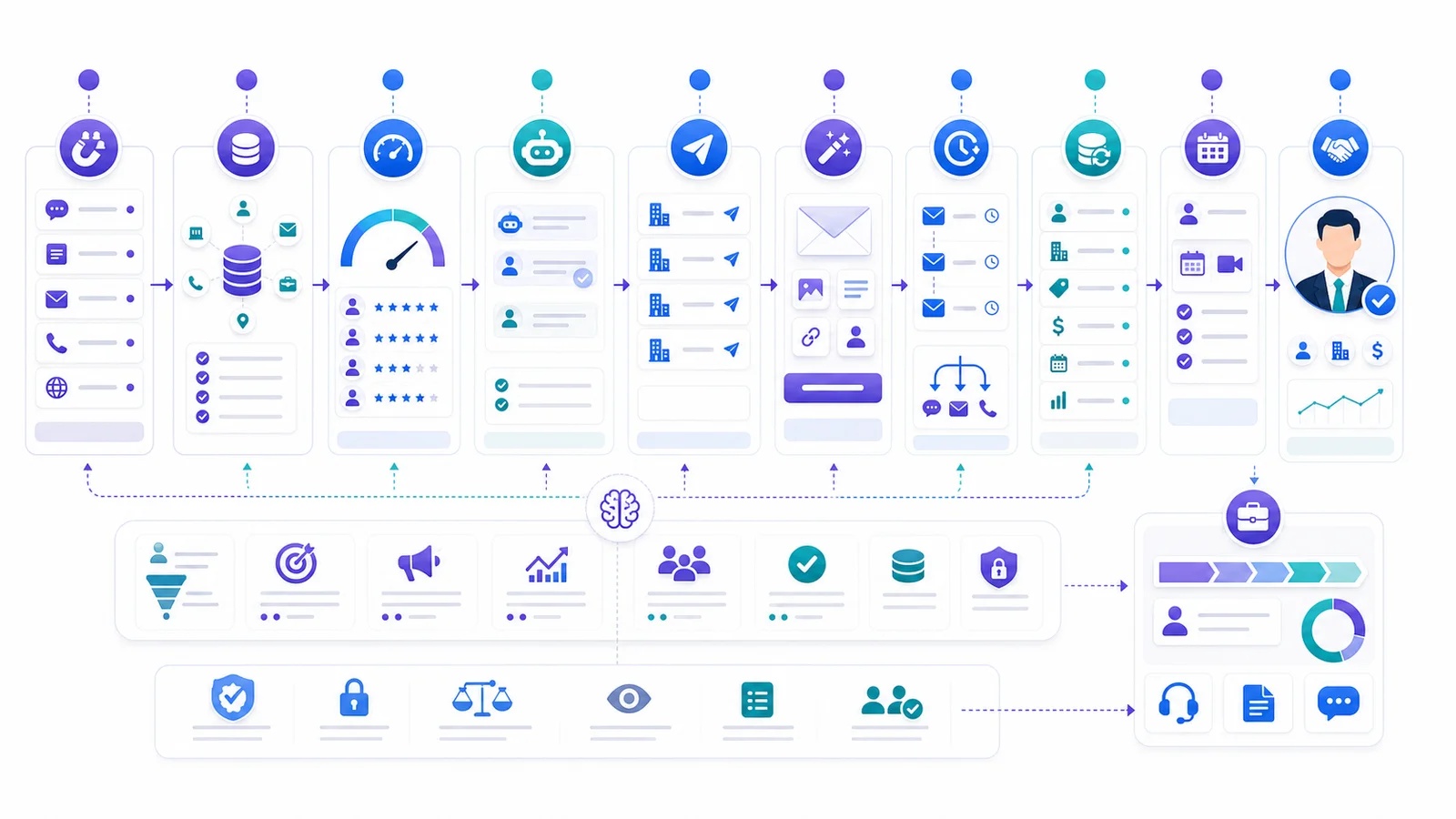
– AI sales process automation works best when the sales process is mapped as a system: triggers, data, AI action, human review, CRM update, and success metric.
– Inbound automation should cover lead capture, response, qualification, routing, booking, and handoff. In GrowthEffect, this is Alim’s lane.
– Outbound automation should cover account sourcing, enrichment, scoring, research, personalization, follow-up, and reply handling. In GrowthEffect, this is Vera’s lane.
– CRM and process automation should support both motions through field updates, owner assignment, summaries, QA, reporting, and governance.
– The safest implementation path is phased: map the process, fix data, automate one high-leak workflow, add human approval, then scale.
– AI should not be treated as a full replacement for human selling. It should remove repetitive first-touch work so humans can handle trust, discovery, negotiation, and closing.
What Is AI Sales Process Automation?
AI sales process automation is the structured automation of repeatable sales work across the funnel: lead capture, enrichment, scoring, qualification, outbound sourcing, message personalization, follow-up, CRM updates, meeting booking, handoff, and deal-stage support.
That definition matters because many teams use “AI sales automation” to describe one narrow feature. A sequence tool is not an end-to-end sales process. A CRM workflow is not a sales agent. A contact database is not a qualification system. A chatbot is not an outbound pipeline engine.
An end-to-end process connects all of those layers.
HubSpot defines sales automation around repetitive tasks such as lead routing, follow-up emails, and data entry. Apollo describes workflows as automations that reduce manual tasks, manage sequence/list actions, schedule tasks, and update records. Salesforce positions Agentforce Sales as AI agents embedded in CRM context for prospecting, qualification, meeting booking, account briefs, and next-best actions.
Those are useful category signals. The operating question is more specific:
What should happen next when a buyer enters your sales system, and who is allowed to make that happen?
If the answer depends on a rep manually checking a form, researching the company, copying notes into the CRM, deciding a score, sending a follow-up, and remembering the next task, the process is fragile. AI can help when the workflow is clearly bounded.
The Sales Process Automation Layer Cake
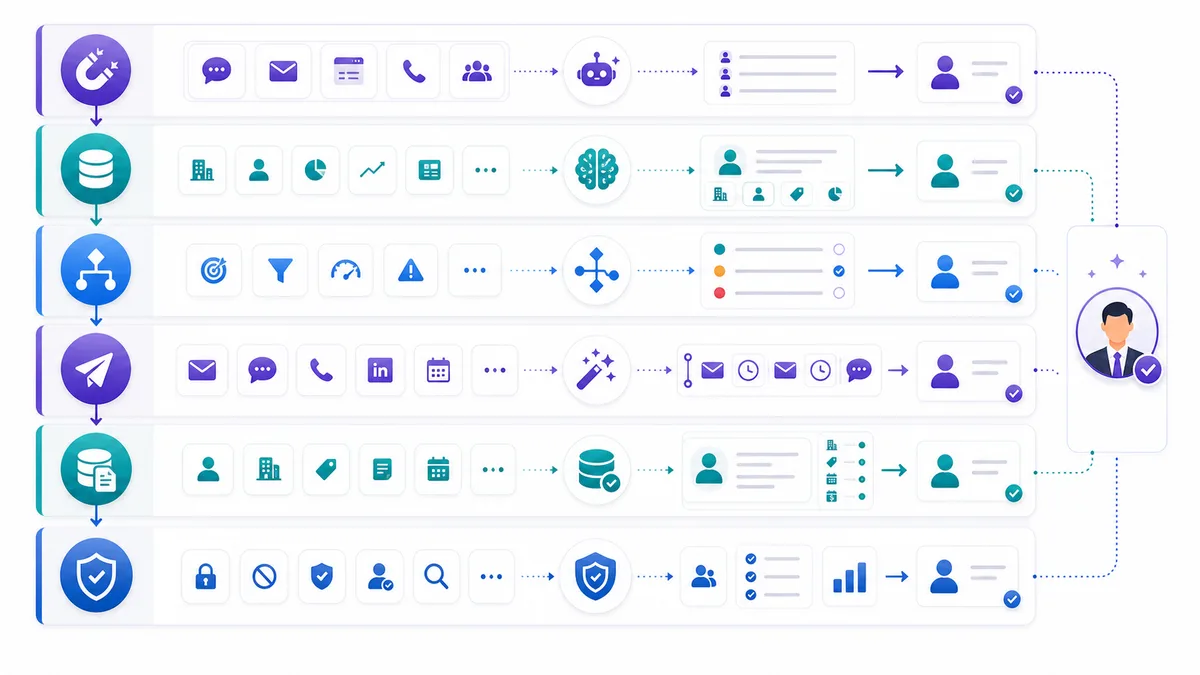
Think of AI sales process automation as six layers:
| Layer | What it does | Example output |
|---|---|---|
| Capture | Detects new demand or target accounts | New form fill, chat, LinkedIn prospect, imported account |
| Context | Enriches and interprets data | Company size, role, source, signal, prior CRM history |
| Decision | Scores, qualifies, routes, or suppresses | Hot lead, low-fit account, review required, owner assigned |
| Action | Sends, drafts, books, follows up, or creates tasks | Reply, sequence draft, calendar link, rep task |
| Record | Updates the system of truth | CRM fields, activity log, summary, status, next step |
| Control | Reviews quality, risk, and performance | Approval queue, blocked claims, compliance checks, KPI review |
Most teams overinvest in the action layer. They buy a tool that sends more messages or creates more tasks. The process still fails if capture is incomplete, context is thin, decisions are inconsistent, records are messy, and controls are weak.
The end-to-end view prevents that.
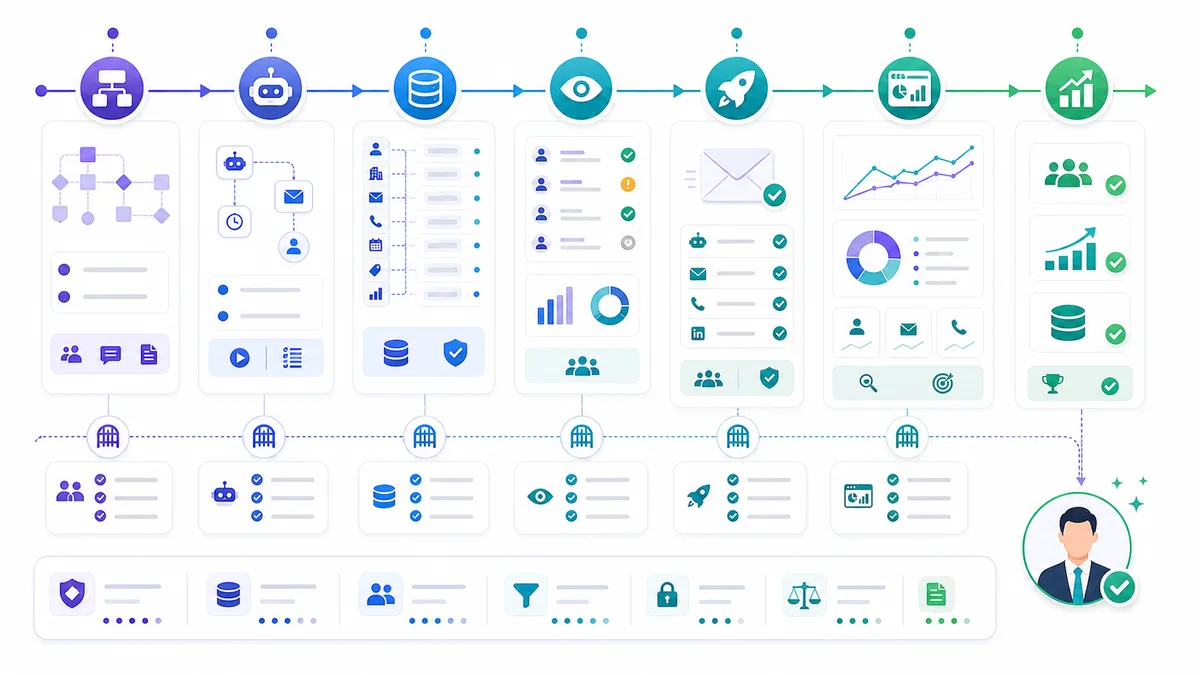
The End-to-End AI Sales Process Map
The most useful way to design AI sales process automation is to map the full path from demand or target account to a human-owned opportunity.
1. Lead Capture
Lead capture is where the process begins. Inbound capture includes demo forms, pricing forms, contact forms, website chat, WhatsApp, Instagram DMs, Facebook Messenger, email, event scans, and product signups. Outbound capture includes target account lists, prospect searches, intent signals, CRM reactivation lists, and market segments.
AI should not treat all captured records the same. A pricing request from a VP at an ICP account is not the same as a newsletter signup. A sourced outbound prospect is not the same as a warm inbound lead who asked for a demo.
The control point is source classification.
Every captured record should receive:
- Source channel
- Source intent
- Inbound or outbound motion
- Campaign or page context
- Existing CRM match
- Required next step
For GrowthEffect, inbound capture belongs to Alim, the inbound AI sales representative. Outbound target capture belongs to Vera, the outbound AI sales representative. The distinction protects the workflow from mixing warm demand with cold prospecting.
2. Enrichment
Enrichment turns a raw lead into a usable sales record. The system looks for company domain, role, seniority, industry, location, headcount, existing CRM ownership, LinkedIn profile, buying signals, and any missing contact information.
The goal is not to fill every possible field. The goal is to fill the fields needed for a better next decision.
For inbound, enrichment helps Alim decide whether the lead should be answered with a short qualification path, routed to an owner, booked directly, or nurtured. For outbound, enrichment helps Vera decide whether a prospect matches the ICP and whether the record is complete enough for research and outreach.
The control point is confidence.
Do not let AI overwrite verified CRM data with low-confidence enrichment. Store source, timestamp, and confidence where the update materially changes routing, scoring, or messaging.
3. Scoring
Scoring turns context into priority. A practical score should include fit, intent, urgency, source quality, role relevance, company relevance, and risk.
For inbound, scoring answers:
- Should this lead get an immediate response?
- Is this a real buying conversation or a low-intent request?
- Should the AI ask more qualification questions?
- Should a human be notified now?
For outbound, scoring answers:
- Does this account match the ICP?
- Is this person the right buyer, user, influencer, or referral path?
- Is there a strong enough signal for personalized outreach?
- Should the record be suppressed before any message is drafted?
The control point is explanation.
A score without a reason is hard to trust. AI should explain the score in plain language, especially when it suppresses a record, escalates to a human, or recommends immediate action.
4. Inbound Qualification
Inbound qualification is a conversation, not a form extension. The system should respond fast, confirm the buyer’s request, ask only the missing questions, and move qualified leads toward booking or handoff.
Alim’s role is inbound first-touch execution: response, qualification, routing, booking support, CRM sync, and handoff. Alim should not be used for cold list building or outbound prospecting.
Good inbound qualification captures:
- Pain or use case
- Company context
- Urgency
- Role and buying authority
- Current process or vendor
- Requested next step
- Disqualification reason
The control point is escalation logic.
Escalate to a human when the lead is high-value, asks pricing-sensitive questions, mentions procurement or legal terms, has a complex technical request, or wants to speak to sales directly. AI can prepare the handoff, but a human should own judgment-heavy conversations.
5. Outbound Sourcing
Outbound sourcing starts before the first message. The system needs a target market, ICP, exclusions, account filters, persona logic, territory rules, and campaign goal.
Vera’s role is outbound pipeline generation: sourcing, enrichment, scoring, research, personalization, outreach, follow-up, and reply handling. Vera should not be used as the inbound form responder because inbound speed-to-lead and outbound prospecting are different jobs.
Good outbound sourcing includes:
- Target segment
- Excluded customers, competitors, open opportunities, and blocked domains
- Account qualification criteria
- Persona and seniority criteria
- Geography and language rules
- Campaign membership
- Review threshold
The control point is pre-send suppression.
Before any outreach starts, the system should check duplicates, opt-out status, existing owner, active opportunity, customer status, competitor status, and regional compliance constraints. More volume does not help if the list is polluted.
6. Personalization and Message Drafting
Personalization is where many AI sales workflows become risky. A message that sounds specific but uses unsupported facts damages trust. A message that is technically accurate but generic gets ignored.
The automation should convert research into a restrained sales angle:
- What changed at the account?
- Why might the buyer care now?
- Which problem is relevant to their role?
- What should the message ask for?
- What should the message avoid?
For outbound, Vera can draft email and LinkedIn messages from approved campaign positioning, account research, sender voice, and sequence step. Human review should stay in place for new campaigns, high-value accounts, sensitive industries, and strong claims.
The control point is claim safety.
If the source cannot be verified, the draft should soften the claim or route to review. AI should not invent customer stories, proof points, integrations, ROI numbers, or private knowledge.
7. Follow-Up and Reply Handling
Follow-up is one of the easiest places to lose revenue. Inbound leads go cold when no one responds after the first question. Outbound prospects reply with interest and still sit in an inbox. Negative replies keep receiving sequences. Referral replies never get routed.
AI can classify replies and recommend next actions:
- Positive interest
- Pricing question
- Objection
- Referral
- Not now
- Wrong person
- Out of office
- Unsubscribe
- Negative response
- Needs human review
For inbound, Alim should keep the buyer moving toward qualification, booking, or human handoff. For outbound, Vera should pause sequences when a meaningful reply arrives, summarize the context, and route the response to the right human or next workflow.
The control point is conservative pausing.
When a reply shows human intent, stop blind automation. If the system is unsure, pause and ask for review.
8. CRM Updates
CRM updates are not admin cleanup. They make automation auditable.
Every AI-run process should write back structured fields and readable notes:
- Lead source
- Status
- Score
- Qualification summary
- Enrichment status
- Owner
- Last meaningful activity
- Next step
- Meeting status
- Suppression reason
- Handoff reason
The CRM should remain the system of truth. AI can create and update records, but teams need field-level rules for what AI may change automatically, what requires review, and what stays human-only.
The control point is auditability.
If a sales manager cannot see why a lead was routed, why a prospect was suppressed, or what the AI told a buyer, the process is not production-ready.
9. Meeting Booking and Human Handoff
Meeting booking is not the finish line. The handoff quality determines whether the human sales team can use the context.
A strong handoff includes:
- Buyer identity and company
- Source and intent
- Qualification summary
- Pain or use case
- Urgency and timeline
- Objections or constraints
- Prior messages
- Recommended discovery angle
- Open questions
- Next step
Alim should prepare inbound meeting context. Vera should prepare outbound reply and prospect context. Shared CRM logic should assign owners, create tasks, update stages, and make sure humans know what happened.
The control point is fact versus inference.
Handoff notes should separate confirmed buyer statements from AI interpretation. “The buyer said they are replacing manual SDR follow-up” is different from “AI inferred they may have an SDR productivity issue.”
10. Deal-Stage Support
AI sales process automation should not stop at the first meeting. It can support opportunity hygiene, next-step reminders, meeting summaries, stakeholder mapping, follow-up drafts, risk alerts, and deal-stage updates.
This stage needs more human control than first-touch work. Negotiation, pricing, legal review, procurement, security review, and final closing should remain human-owned.
The control point is authority.
AI can recommend, summarize, draft, remind, and update records. It should not commit custom pricing, legal terms, product commitments, delivery timelines, or discounts without approval.
How Alim and Vera Split the Process in GrowthEffect
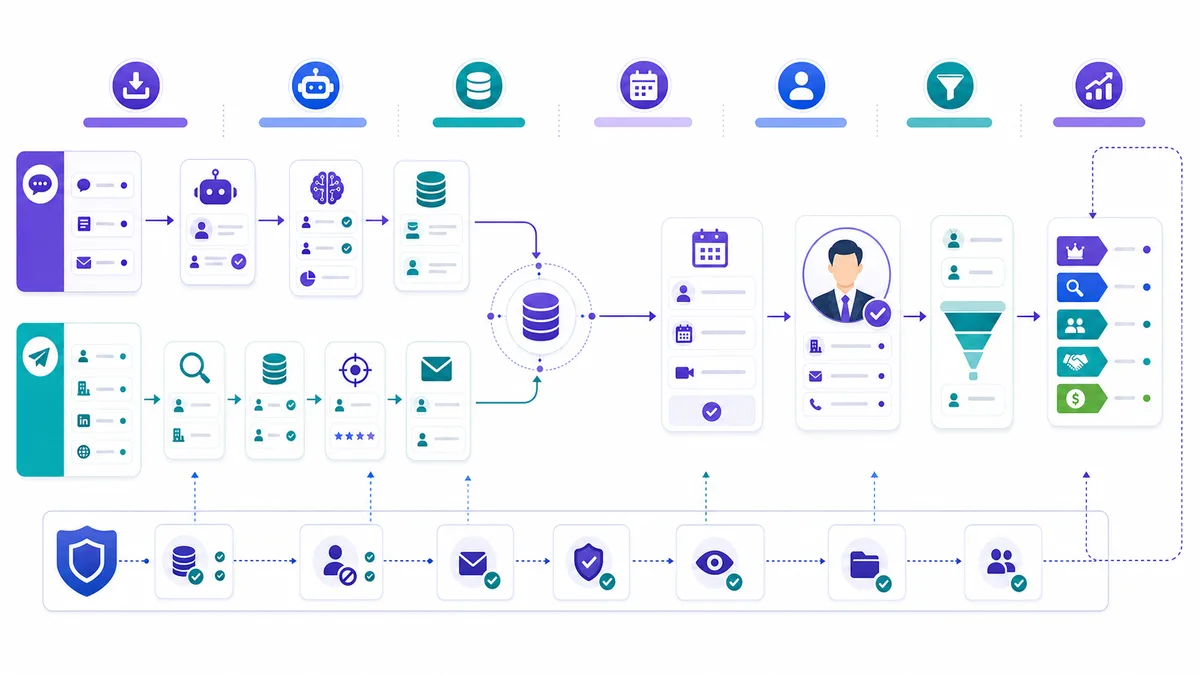
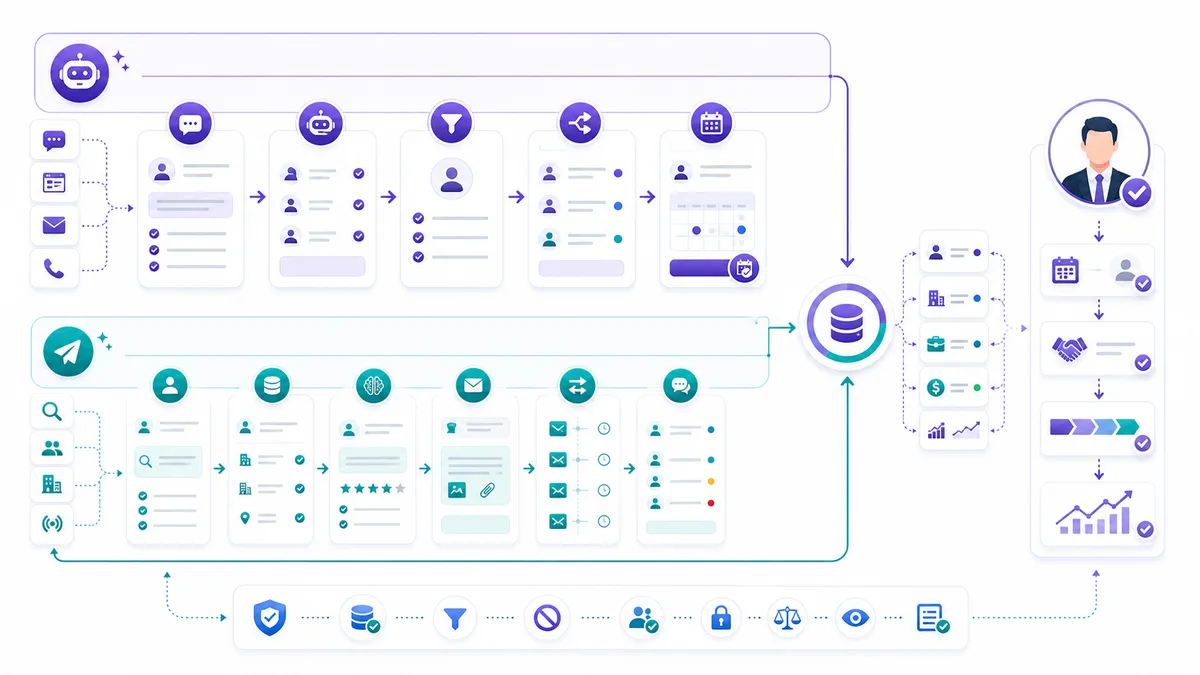
GrowthEffect is built around a simple operating model: AI sales employees handle repeatable first-touch sales work, while human sales teams handle the high-trust moments.
That model only works if product responsibilities stay clear.
Alim: Inbound AI Sales Representative
Alim owns inbound sales process automation.
Use Alim for:
- Website form response
- Chat, email, social DM, and other inbound first touch
- Lead qualification
- Speed-to-lead coverage
- Routing and owner assignment support
- Calendar booking support
- CRM sync
- Human handoff summaries
Do not use Alim as an outbound sourcing engine. Inbound buyers already showed intent. The job is to respond quickly, ask useful questions, and route correctly.
Vera: Outbound AI Sales Representative
Vera owns outbound sales process automation.
Use Vera for:
- ICP-based account sourcing
- Prospect enrichment
- Fit scoring
- Account and lead research
- Buying signal interpretation
- Personalized email and LinkedIn outreach
- Follow-up
- Reply classification
- CRM reactivation
Do not use Vera as a generic inbound chatbot. Outbound requires targeting, list hygiene, message approval, sequence controls, and reply triage.
Shared CRM and Process Layer
The shared layer is where teams often get confused. CRM updates, handoff rules, reporting, QA, field mapping, and ownership logic support both Alim and Vera. They do not mean the products do the same job.
Shared areas include:
- Contact and company creation
- Deduplication
- Owner assignment
- Lifecycle stage updates
- Meeting records
- Activity logging
- Handoff notes
- Approval queues
- Suppression lists
- Pipeline reporting
This is the control layer. It helps Alim and Vera work inside the same revenue system without blurring inbound and outbound responsibilities.
Implementation Phases for AI Sales Process Automation
The biggest mistake is trying to automate the whole funnel in one launch. A safer path is phased.
Phase 1: Map the Current Sales Process
Document how leads and target accounts move today.
Map:
- Entry points
- Required fields
- Current owners
- Qualification rules
- Routing rules
- Follow-up steps
- CRM fields
- Meeting booking process
- Handoff notes
- Common failure points
Look for revenue leaks rather than tool gaps: slow inbound response, low-quality outbound lists, weak scoring, generic messages, missed follow-ups, bad CRM hygiene, and unclear ownership.
Output of this phase: one process map and a ranked list of automation candidates.
Phase 2: Clean the Minimum Data Needed
You do not need a perfect CRM to start. You do need the fields that drive automation decisions.
Clean or define:
- Lead source
- Lifecycle stage
- Owner
- Company domain
- Contact email
- Existing customer flag
- Active opportunity flag
- Opt-out or suppression status
- Country or region
- Segment or ICP tier
Output of this phase: a minimum viable data model for automation.
Phase 3: Choose One High-Leak Workflow
Start with one workflow where automation can remove obvious friction.
Good first choices:
- Inbound demo request qualification
- Speed-to-lead routing
- Outbound account sourcing and scoring
- Personalized outbound draft review
- Reply classification and handoff
- CRM field hygiene
Avoid starting with the most complex, high-risk workflow. Do not begin with negotiation, pricing, legal answers, or enterprise opportunity management.
Output of this phase: one workflow with trigger, data, AI action, human handoff, CRM update, metric, and guardrail.
Phase 4: Add Human Approval and QA
Human approval is how teams learn where AI is reliable and where it needs tighter instructions.
Review:
- Message quality
- Research accuracy
- Scoring explanations
- Routing decisions
- CRM updates
- Suppression logic
- Handoff summaries
- Edge cases
Output of this phase: approval thresholds and a QA loop.
Phase 5: Scale Across Adjacent Steps
Once one workflow is reliable, expand to the next connected step. If you started with inbound qualification, add booking and handoff. If you started with outbound scoring, add research and draft generation. If you started with reply classification, add CRM updates and owner tasks.
Output of this phase: a connected process, not a collection of disconnected automations.
Phase 6: Govern Performance
Sales automation needs operating reviews.
Track lead response time, qualification completion, meeting booking rate, accepted lead rate, suppression accuracy, draft approval rate, positive reply rate, handoff time, CRM completeness, and human override reasons.
Output of this phase: a weekly operating review that improves the system.
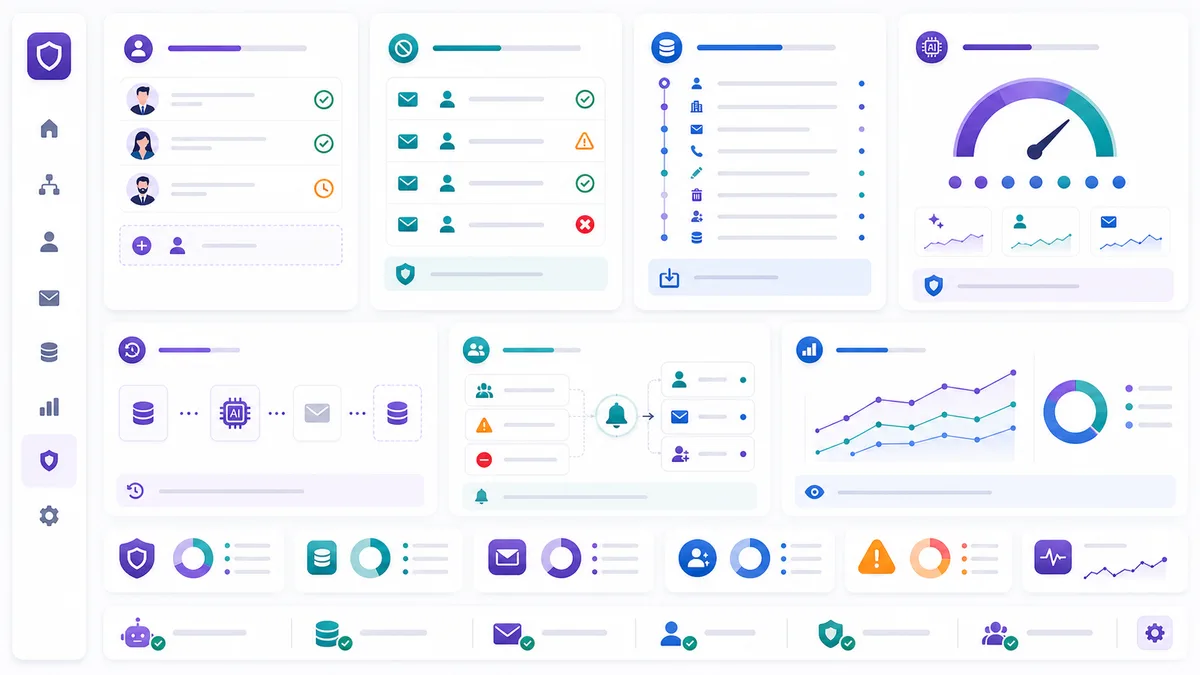
Control Points and Governance for Production Use
AI sales process automation should be designed like a revenue system, not a writing shortcut.
The core control points are simple.
| Control point | What it prevents | Practical rule |
|---|---|---|
| Source classification | Treating every lead the same | Separate inbound demand, outbound targets, reactivation, and referrals |
| Data confidence | Bad enrichment and wrong routing | Store source and confidence before AI changes key fields |
| Human approval | Unsafe messages and bad handoffs | Review new campaigns, strategic accounts, and sensitive claims |
| Suppression checks | Duplicate or unwanted outreach | Check opt-outs, customers, active deals, competitors, and blocked domains |
| Claim safety | Invented proof or false personalization | Only use verified facts in buyer-facing copy |
| CRM audit trail | Black-box decisions | Store summaries, reasons, owners, and timestamps |
| Escalation logic | AI handling judgment-heavy moments | Route pricing, legal, security, procurement, and complex objections to humans |
Where Official Platforms Fit
HubSpot is useful when your sales process is already centered on HubSpot CRM and you need lead management, sequences, workflows, and AI-assisted sales activity in one workspace. Its official pages emphasize lead rotation, task creation, prospect follow-up, sequences, workflows, and CRM-connected automation.
Apollo is useful when the workflow needs prospecting data, lists, sequences, tasks, and automated actions around contacts and accounts. Its workflow documentation covers sequence/list actions, task scheduling, job-change updates, and manual-work reduction.
Salesforce Agentforce Sales is useful when a company wants AI agents embedded inside Salesforce workflows and data. Salesforce describes Agentforce Sales around prospecting, qualification, meeting booking, account briefs, next-best actions, and seller control.
Outreach and Salesloft are better understood as sales engagement or revenue orchestration layers for larger teams with complex rep workflows, governance needs, and pipeline execution requirements.
GrowthEffect is different because it frames the work as digital sales employees. Alim handles inbound. Vera handles outbound. The CRM/process layer helps them operate with human teams.
A Practical Operating Model for B2B Teams
Use this operating model when deciding what to automate.
Step 1: Define the Sales Job
Do not start with the tool. Start with the job: respond to demo requests, qualify inbound leads, build ICP lists, research outbound accounts, classify replies, or update CRM fields. Each job needs a clear owner, trigger, input, output, metric, and stop condition.
Step 2: Decide the Automation Boundary
AI can execute some steps and assist others.
Use full automation when the task is repetitive, low-risk, and rule-bound. Use human approval for buyer-facing copy, high-value accounts, ambiguous data, or judgment. Use human ownership for trust, discovery, pricing, negotiation, legal terms, or closing.
This boundary keeps automation useful without pretending every sales moment is the same.
Step 3: Design the CRM Write-Back
If the CRM is not updated, the process did not really happen. Define which fields AI may create, which it may update automatically, which require approval, which stay human-only, which activities get logged, and which summary format humans need.
Step 4: Measure Process Quality, Not Just Activity
Activity metrics are easy to inflate. Process quality is harder and more useful.
Measure:
- How many high-intent leads got a fast response?
- How many bad-fit prospects were suppressed before outreach?
- How many AI-drafted messages were approved without major edits?
- How many positive replies were handed to humans quickly?
- How many meetings had useful context?
- How many CRM records were complete after automation?
That is the difference between “more AI activity” and process improvement.
Step 5: Keep the Human Sales Team in the Loop
AI sales process automation should make humans more effective, not blind.
Humans should see why a lead was scored high or low, what AI told the buyer, what sources were used for personalization, which records were suppressed, which fields changed, which conversations need judgment, and which automation rule failed.
When humans can inspect and correct the system, automation improves. When AI acts invisibly, trust disappears.
Common Mistakes to Avoid
Mistake 1: Automating a Broken Process
AI will not fix a sales process with no ICP, routing rules, owner logic, qualification criteria, or CRM discipline. Fix the smallest process map first.
Mistake 2: Mixing Inbound and Outbound Responsibilities
Inbound and outbound can share a CRM, but not the same operating logic. Inbound starts with buyer intent. Outbound starts with target selection.
That is why GrowthEffect separates Alim and Vera.
Mistake 3: Letting AI Send Before the Controls Exist
Buyer-facing automation needs guardrails. Check source accuracy, approved messaging, opt-outs, duplicate accounts, active opportunities, and unsupported claims before any send.
Mistake 4: Measuring Only Meetings Booked
Meetings matter, but they are not the only signal. Track data quality, handoff quality, suppression quality, speed-to-lead, positive reply handling, and human override patterns.
Mistake 5: Expecting AI to Own Closing Judgment
AI can support deal-stage work with summaries, next-step drafts, and CRM hygiene. Humans should still handle discovery depth, negotiation, procurement, legal review, security review, custom terms, and final closing decisions.
FAQ
What is AI sales process automation?
AI sales process automation is the use of AI and workflow systems to run repeatable sales steps such as lead capture, enrichment, scoring, qualification, outreach, follow-up, CRM updates, meeting booking, and handoff. It should be designed with human controls for judgment-heavy moments.
Which sales process should B2B teams automate first?
Start with the highest-leak workflow that is repetitive and measurable. For many B2B teams, that is inbound demo request qualification, speed-to-lead routing, outbound list scoring, personalized outbound draft review, or reply classification.
Does AI sales process automation replace SDRs?
No. The practical use case is to automate repetitive first-touch work and admin so human sellers spend more time on qualified conversations. AI can handle sourcing, qualification, research, follow-up, summaries, and CRM updates, but humans should own trust, discovery, negotiation, and closing.
How do Alim and Vera fit into the sales process?
Alim handles inbound sales process automation: response, qualification, routing, booking support, CRM sync, and human handoff. Vera handles outbound sales process automation: sourcing, enrichment, scoring, research, personalized outreach, follow-up, reply classification, and pipeline generation.
What tools are commonly used for AI sales process automation?
Teams often combine CRM workflows, enrichment tools, sales engagement platforms, AI agents, and reporting. HubSpot, Apollo, Salesforce Agentforce Sales, Outreach, and Salesloft can support different layers. GrowthEffect focuses on the digital sales employee layer through Alim for inbound and Vera for outbound.
Conclusion: Automate the Sales Process, Not Just the Task
AI sales process automation is not about adding a clever AI feature to a messy funnel. It is about designing a reliable operating system for first-touch sales work.
Start with the full map: capture, enrichment, scoring, inbound qualification, outbound sourcing, personalization, follow-up, CRM updates, meeting booking, handoff, deal-stage support, and governance. Then decide which jobs belong to AI, which require approval, and which must remain human-owned.
For GrowthEffect, the split is clear. Alim protects inbound demand. Vera creates outbound pipeline. Shared CRM and process controls keep the work visible, auditable, and useful for the human sales team.
If you want to map this to your own funnel, book a GrowthEffect demo. Bring one inbound lead path, one outbound campaign, and one CRM handoff problem.
For more related reading, compare this guide with GrowthEffect’s AI sales workflows guide, AI sales automation tools comparison, and how to automate sales with AI.
Source List
- HubSpot Sales Automation for sales automation tasks such as lead rotation, task creation, follow-up sequences, workflows, and CRM-connected automation.
- HubSpot Sales Automation glossary for the definition of sales automation as repetitive task automation around lead routing, follow-up, and data entry.
- Apollo Workflows Overview for workflow automation examples including sequence/list actions, task scheduling, and record updates.
- Apollo Create a Workflow for Apollo workflow setup and automation context.
- Salesforce Agentforce Sales announcement for Salesforce’s positioning around AI agents handling prospecting, qualifying leads, booking meetings, account briefs, next-best actions, and seller approval.
- Salesforce AI Sales Agents for Agentforce sales-agent capabilities around prospecting, enrichment, personalized outreach, and CRM context.
- Outreach and Salesloft used only as category references for sales engagement and revenue orchestration layers.
Leave a Reply