
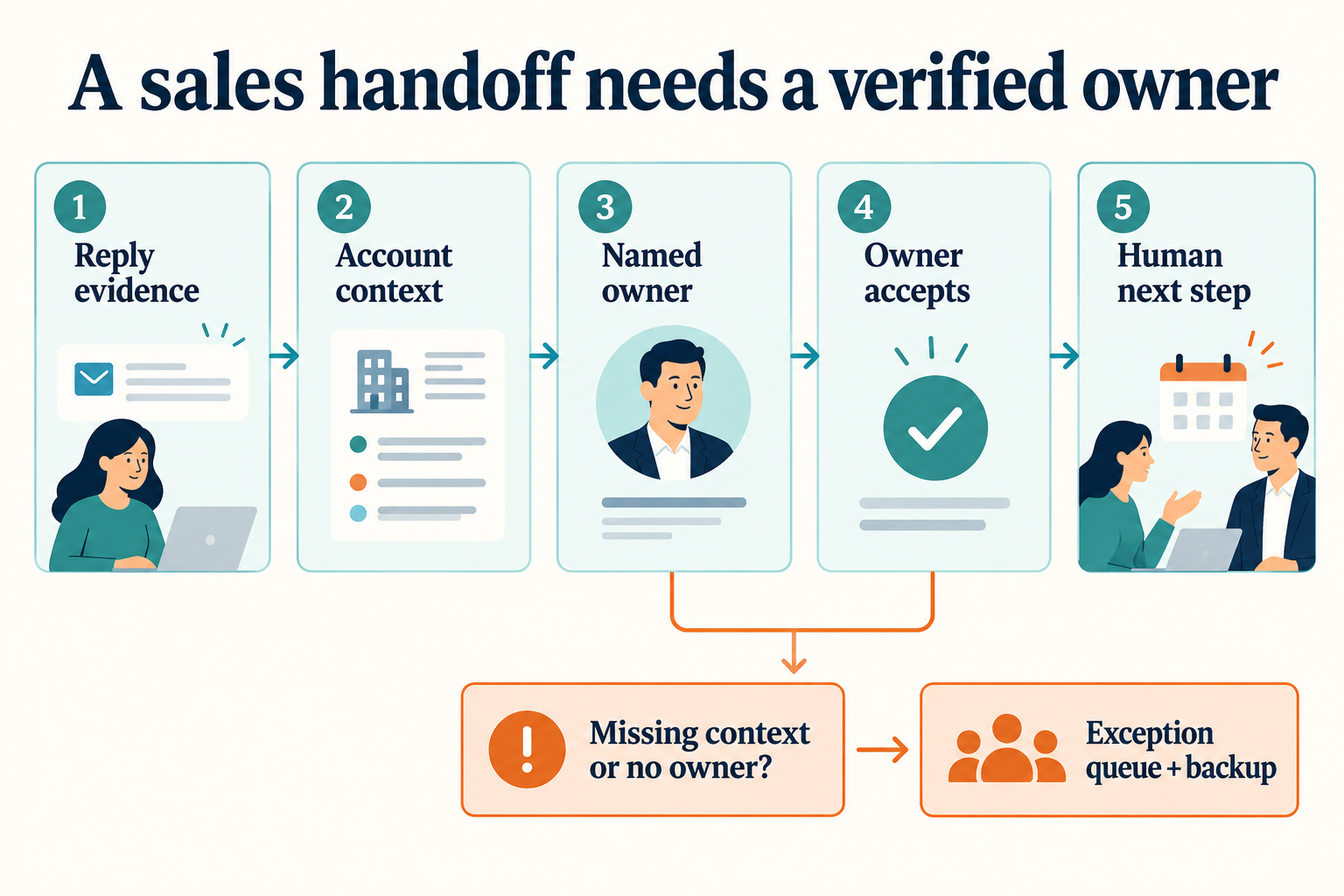
Sales handoff automation moves a buyer conversation from an AI-assisted workflow to a responsible human seller, with the evidence, next action and deadline needed to continue it. A CRM owner change or a Slack notification can help, but neither proves that somebody has accepted the work or contacted the buyer.
This guide focuses on the AI SDR-to-human sales handoff: an outbound reply, referral or demo request that now needs a seller. It is different from the post-sale handoff to customer success. The practical goal is to make every promising conversation traceable from the original message to a named person and a recorded next step.
Reviewed October 18, 2026. The workflow and examples below are recommendations, not a claim that every CRM or AI sales product implements them automatically.
What should a sales handoff contain?
Build a compact handoff record that a seller can verify without reconstructing an entire campaign. Keep the original evidence accessible, while summarizing only the information needed for the next decision.
- Buyer evidence: the message link or CRM activity, channel, timestamp and relevant buyer wording.
- Account context: company, contact, outreach reason and any existing customer or opportunity relationship.
- Qualification: confirmed facts, missing information and uncertainties. A question about price is not proof of budget.
- Routing: a named owner, why that person was selected and a backup route.
- Next action: what the seller should do, the acceptance deadline and the buyer-facing action deadline.
- Automation state: which automated follow-ups have been paused or suppressed and who may resume them.
For the research that informs this package, see our AI account research guide. For record matching and approved field updates, use the separate AI CRM automation guide. Here, the focus is responsibility for the live conversation.
Separate assignment, acceptance and action
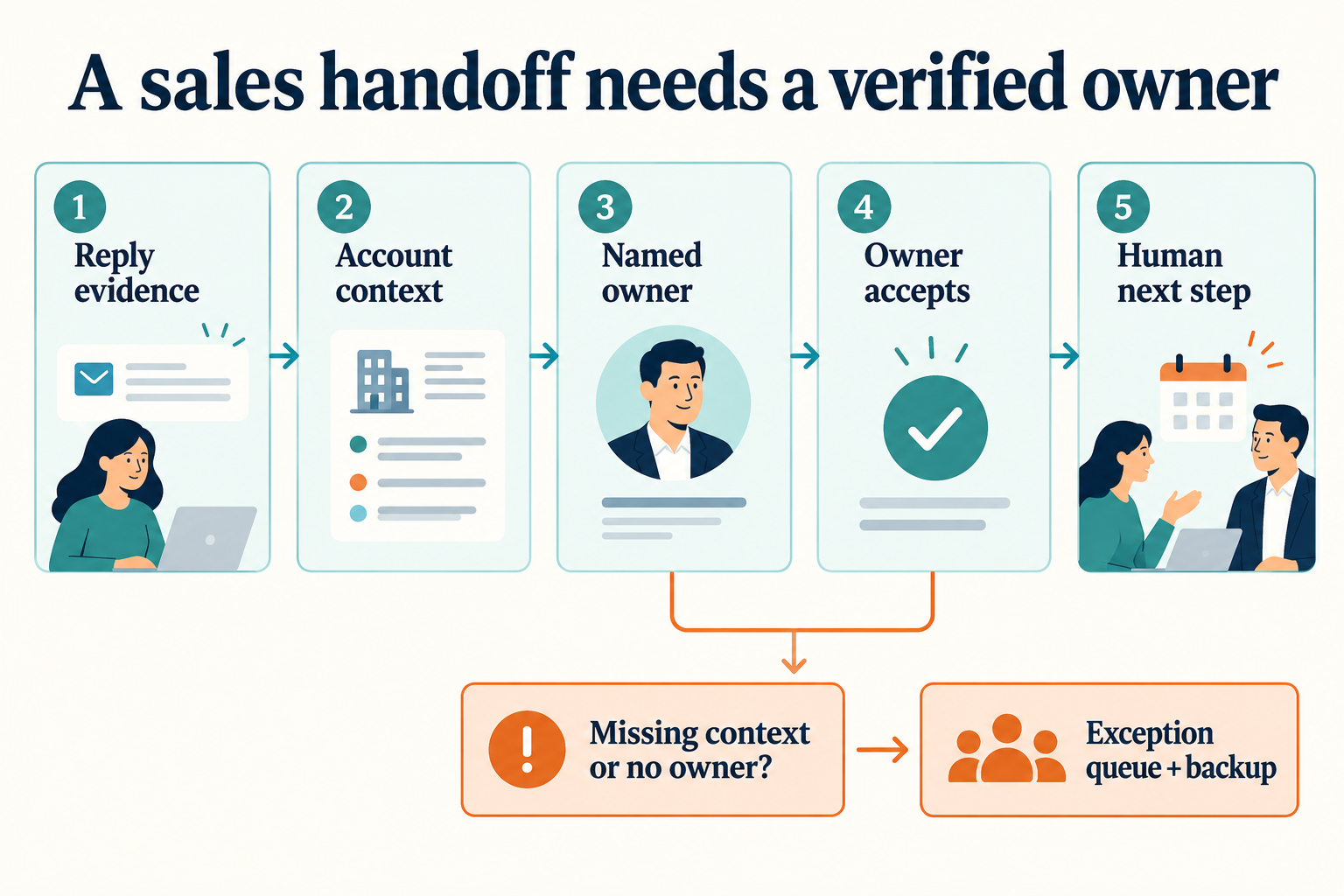
Use distinct states rather than treating an owner field as the finish line. These are suggested operating labels; map them to the objects and fields your system actually supports.
- Ready: the relevant reply and minimum context have been collected.
- Assigned: the record or task points to an eligible seller or queue.
- Accepted: a named person has acknowledged responsibility.
- Actioned: the seller has taken the next buyer-facing step and recorded it.
- Returned or escalated: context is missing, the route is wrong, or the owner cannot act.
A returned handoff should include a reason and a new owner or exception route. Otherwise, a return simply creates another place for the conversation to disappear. Avoid marking a record as qualified solely because someone accepted it: ownership acceptance and commercial qualification answer different questions.
Define deadlines by the buying situation, working hours and team coverage. An explicit demo request during staffed hours may need a different response target from a timing objection received overnight. There is no universal deadline that fits every B2B motion. Store the time zone and show whether a deadline uses calendar time or staffed hours.
A worked example: an integration question plus security review
Illustrative example, not a customer case: a fictional prospect, Northline Systems, replies to approved outreach: “Can this work with our Salesforce setup? We also need security review before a demo.”
A weak handoff says “Interested lead. Book demo.” That skips the buyer’s conditions. A better handoff contains:
- Trigger: product/integration question and security-review request.
- Evidence: the original reply attached or linked, with its timestamp.
- Known: the buyer mentions Salesforce and wants security review before a demo.
- Unknown: their Salesforce configuration, required permissions, review requirements, budget and buying timetable.
- Owner: the existing account owner, if one exists; otherwise the designated seller for the segment.
- Next step: acknowledge the request, clarify the required Salesforce actions and arrange the appropriate security-review path. Do not promise unsupported integration behavior or book over the stated condition.
- Timing: acceptance and response deadlines selected from the team’s agreed coverage policy.
- Follow-up control: suspend the generic “ready for a demo?” sequence while the human handles the question.
The seller can then accept, ask for missing context or return the handoff with a reason. An automated classifier’s “positive” label is an input, not a substitute for reading the buyer’s actual request.
Build routing around the existing relationship
Before round-robin assignment, check whether the company already has an owner, open opportunity or customer relationship. Make your precedence rules explicit: for example, an existing opportunity owner may take priority over a new-prospect territory rule. Treat ambiguous company matches as exceptions rather than silently creating competing ownership.
Decide which system owns assignment when multiple systems sync records. In HubSpot’s owner-rotation documentation, the vendor warns that Salesforce owner synchronization can restore the previous owner after a workflow change. It also distinguishes the behavior of different object types. Test the actual contact, company, lead or ticket workflow you intend to use instead of assuming they behave identically.
For contact-record rotation, verify the eligible user pool and fallback when nobody qualifies. HubSpot’s general distribution guidance describes the possibility of leaving a record unassigned when there is no eligible user; that section explicitly excludes lead- and ticket-based workflows. Seat eligibility matters; check availability controls for the specific object and workflow you use. These details belong in your implementation test, not in a blanket claim that “round robin always finds someone.”
Verify that the receiving seller can see the conversation
Record association is part of a handoff. A reply visible on one object may be absent from the seller’s working view. HubSpot documents separate lead-ownership and activity-sync settings: lead ownership is independent by default, and associated contact/company activities are not automatically synchronized to leads by default.
Therefore, test the view the seller actually opens. Can they access the source reply? Is it linked to the correct contact and opportunity? Are the summary and next step readable? If activity sync is enabled, check its timing and eligibility constraints. Do not assume a successful write to a contact makes the same context available everywhere.
Keep summaries concise and separate observation from inference. “The buyer requested a security questionnaire” is a fact if supported by the message. “Enterprise-ready opportunity” may be an inference. Where useful, include the relevant quotation and mark unknowns explicitly. Only include customer information the receiving person is authorized to see.
Test notification and queue acceptance separately
Salesforce assignment rules evaluate entries in order and use the first match. Their documentation also distinguishes assignment from notification: without an email template, the rule does not send an owner-notification email. A final catch-all entry can handle otherwise unmatched records.
In Salesforce, a seller can accept leads from a queue when they have the required permission. This establishes record ownership. It does not independently prove that the lead is qualified, a response deadline was agreed or the buyer received a reply. Record those outcomes separately in your process.
Decide what happens when a notification fails or an owner does not respond. Use a visible exception queue with a responsible backup person. A silent retry can be useful for a temporary delivery problem, but it must not leave the team believing the buyer has already been handled. Verify the final record and action rather than relying only on a successful automation run.
Seven failure tests before enabling a handoff workflow
- Reply on the wrong object: put the reply on a contact and inspect the seller’s lead view. Expected result: accessible evidence, or an explicit missing-context exception.
- Owner changed, notification missing: verify the owner field and the notification destination independently. Expected result: a visible task or an exception, not an assumed successful handoff.
- Sync reverses ownership: check the record after the connected CRM sync cycle. Expected result: the documented authoritative owner remains in place, or the conflict is raised.
- Queue receives work nobody claims: let an acceptance deadline expire in a test. Expected result: the agreed backup route becomes visible to its owner.
- Acceptance without action: accept the task but take no buyer-facing step. Expected result: the action deadline remains open; acceptance does not close the work.
- Duplicate reply event: deliver the same test event twice. Expected result: no duplicate human tasks or duplicate buyer replies. Confirm what your implementation actually does before relying on it.
- Existing customer appears as a new lead: test a known account with an open opportunity. Expected result: relationship-aware routing or a reviewed exception.
Use test contacts and non-production destinations where possible. Keep a small test log containing the input, expected outcome, observed owner, source record, notification result and remaining issue. Re-run relevant tests when routing rules, integrations or team membership change.
Measure accepted conversations, not only automation activity
Agree on definitions before comparing results. The following are proposed operating measures, not industry benchmarks or GrowthEffect customer results:
- Acceptance-deadline compliance: handoffs accepted before their deadline divided by eligible handoffs whose deadline has elapsed.
- First human action time: the first logged human buyer-facing action timestamp minus the handoff-ready timestamp. Report staffed-hours and elapsed-time views separately if both matter.
- Unresolved handoffs: overdue assignments without acceptance, a documented return or an active escalation.
- Evidence completeness: sampled handoffs containing the source reply, confirmed context, owner, next action and deadlines.
- Commercial outcome: qualified meetings held and opportunities accepted by sales, tracked separately from notifications and booked meetings.
Compare equal, completed time windows and consistent cohorts. Exclude test events transparently. Review returned and failed handoffs as well as successful ones. If attribution or CRM logging is incomplete, report the gap rather than turning a task count into a revenue claim.
Where Vera fits
Vera is GrowthEffect’s AI sales agent. It can research accounts, prepare outreach, work with CRM context and automate approved sales work. Its role is broader than a fixed outbound sequence. Your team sets the access and approval boundaries.
Use this handoff checklist as a specification for the process you want to evaluate. The exact reads, writes, triggers and communication actions depend on your connected systems, plan and permissions; check the integration scope. Do not assume the acceptance states, backup rules or deduplication tests in this guide are preconfigured product features.
Book a demo with one anonymized reply example and the CRM objects your sellers use. Review the path from evidence to owner and next action, including failure cases. See current pricing for plan details.
Frequently asked questions
Is sales handoff automation the same as lead routing?
Routing selects a destination. A complete handoff also supplies evidence, verifies ownership, defines the next action and keeps unresolved work visible.
When should an AI SDR hand off to a person?
When the buyer requests a human, needs a commercial or technical decision outside the approved scope, raises a complex objection, or reaches your agreed qualification threshold. Pricing commitments, security answers and negotiations need the appropriate authorized person.
Should every positive reply trigger a demo?
No. A referral, an integration question and a meeting request are different signals. Preserve the buyer’s wording and choose the next step that answers their request.
Can we use the same handoff for inbound and outbound?
You can share core evidence and ownership fields, but use different triggers and context. Inbound may begin with a form or chat request; outbound needs the original outreach and reply history. Neither should overwrite an existing account relationship without a deliberate rule.
Leave a Reply