
Sales handoff automation means moving a qualified lead, reply, or booked meeting into the right human workflow with the right CRM context, owner, and next step already attached. For B2B teams using AI in sales, that matters more than the chatbot or sequence itself. If the handoff is vague, slow, or missing context, AI can create activity without creating qualified conversations.
Key Takeaways
– Sales handoff automation is not just a notification. It is a routing and context problem.
– The useful goal is not “handoff faster.” It is “handoff with enough context that the rep can act immediately.”
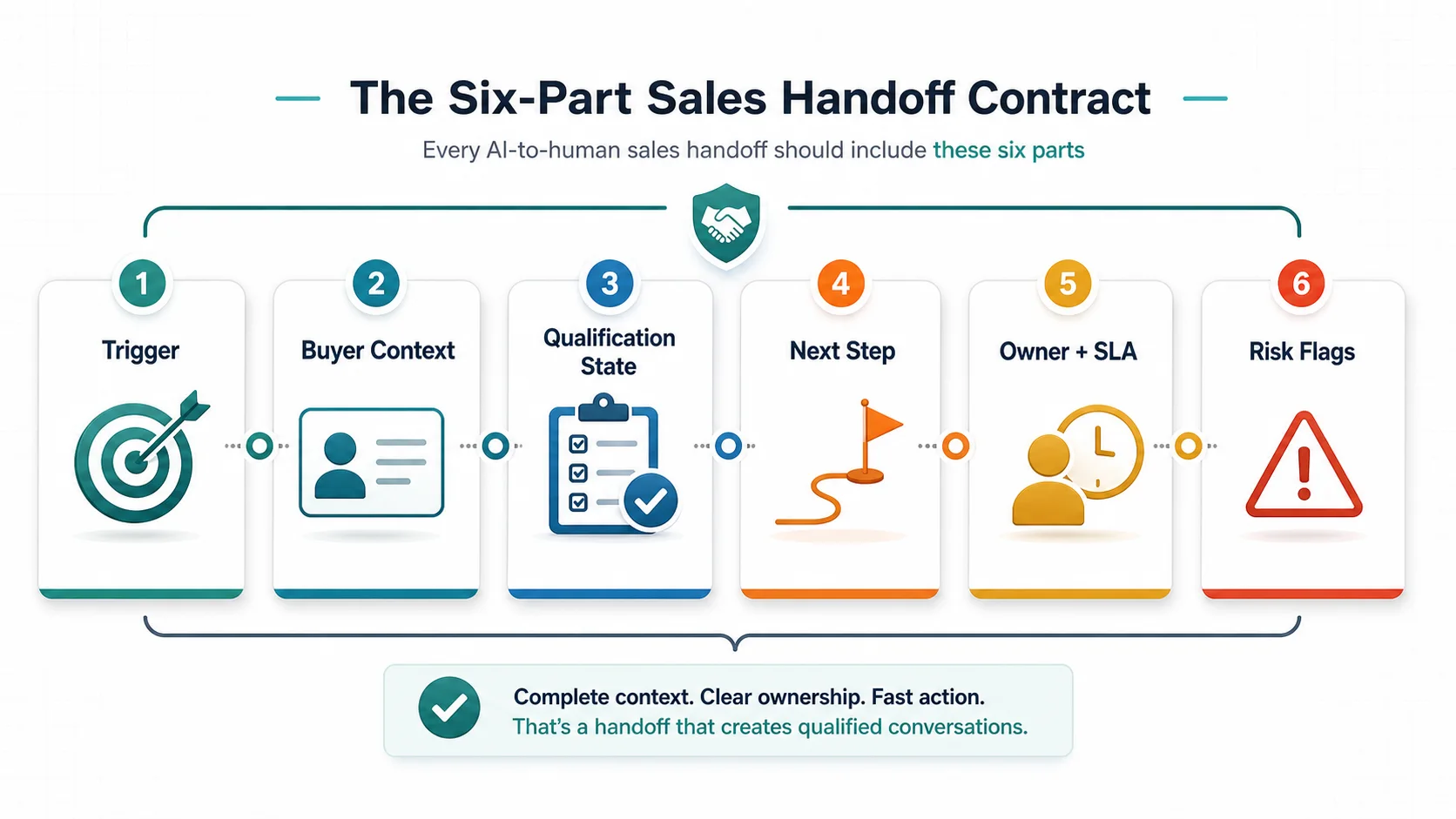
– The cleanest operating model is a six-part handoff contract: trigger, buyer context, qualification state, next step, owner plus SLA, and risk flags.
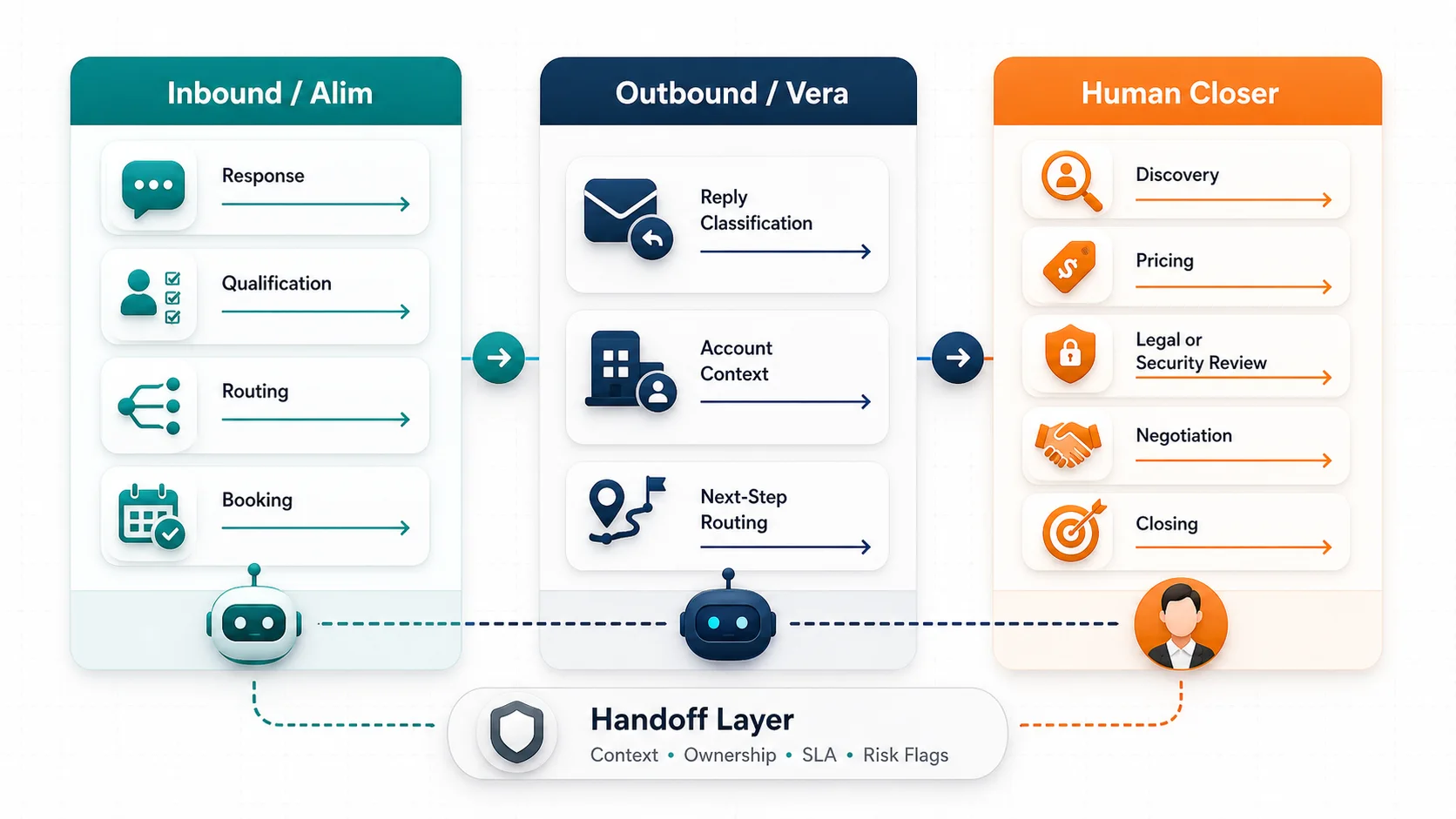
– Inbound and outbound handoffs should not be mixed. Alim-style inbound handoffs and Vera-style outbound handoffs require different triggers and different CRM fields.
– Humans still own discovery, pricing, legal or security review, negotiation, and closing.
What Is Sales Handoff Automation?
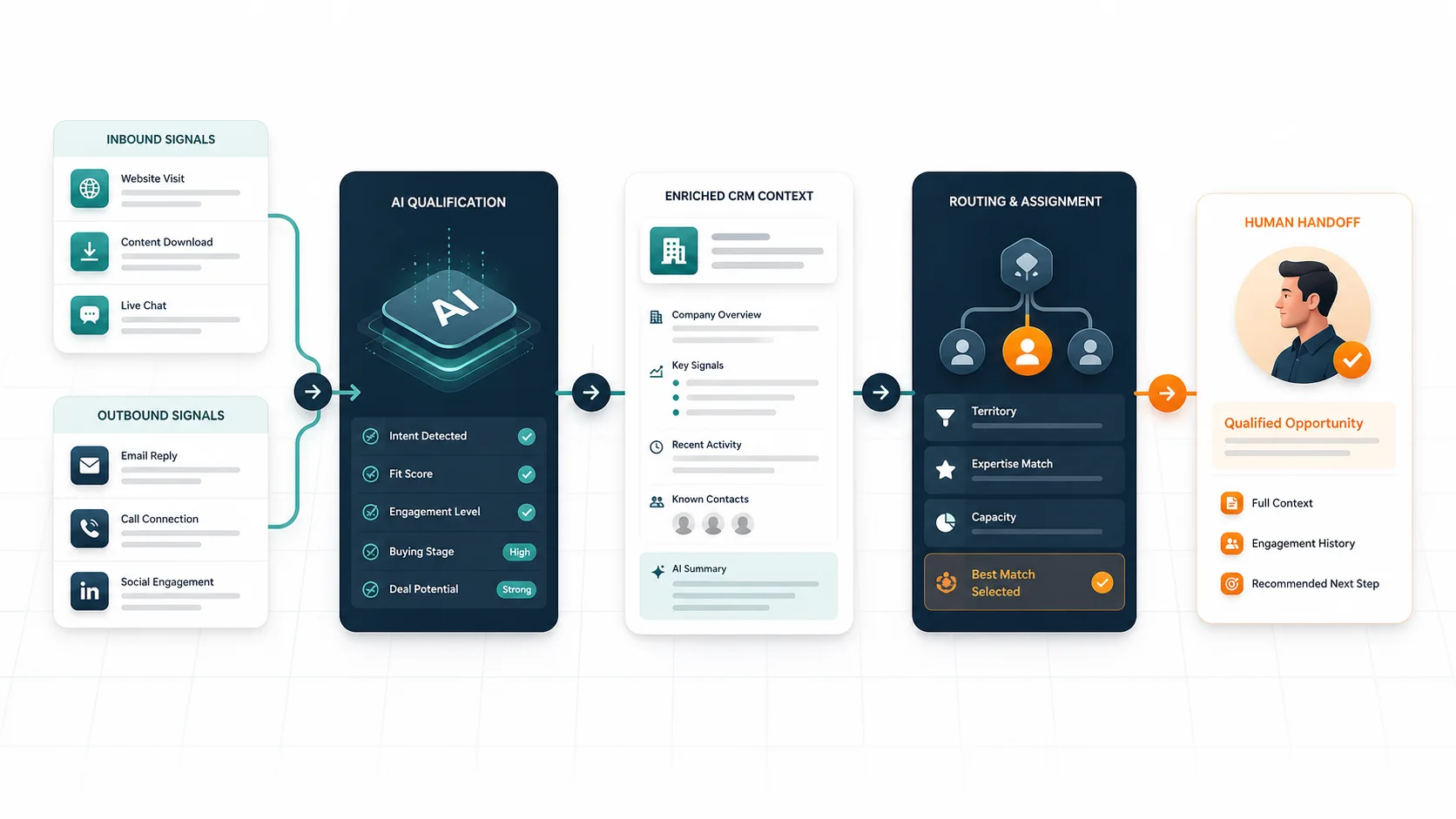
Sales handoff automation is the system that decides when AI should stop, which human should take over, what the CRM record must contain, and how fast the next action should happen.
That sounds obvious, but many teams still treat handoff as a single Slack alert or owner assignment. That is too shallow. A real handoff needs four things to happen together:
- the right lead or reply is identified
- the right owner is selected
- the CRM is updated with context
- the next human action is made explicit
HubSpot’s lead routing guidance describes automatic routing as a decision engine that evaluates layers such as product, region, fit, intent, and rep availability. That is the right frame. The handoff is not one rule. It is a stack of rules.
Salesforce’s AI for Sales page frames the same problem from the AI side: use CRM-grounded responses, hand off qualified prospects fast, and keep pipeline fields updated consistently. That is why the handoff layer belongs inside the sales operating system, not in a disconnected note.
Why Do AI-Qualified Leads Still Get Lost?
Most handoff failures are not model failures. They are workflow failures.
Here is the usual pattern:
| Failure mode | What actually happens | Commercial cost |
|---|---|---|
| no clear trigger | AI keeps talking when a human should step in, or escalates too early | buyer frustration or rep overload |
| weak routing logic | qualified leads go to the wrong rep, queue, or region | slower follow-up and lower trust |
| missing CRM context | sales sees a name but not the source, qualification status, or next step | rep has to re-qualify from scratch |
| no owner plus SLA | everybody assumes someone else will pick it up | warm intent goes cold |
| no risk flags | pricing, compliance, enterprise, or angry-buyer cases look the same as easy ones | high-value deals get mishandled |
This is where a lot of teams misread AI performance. The AI may have done its job. The leak happens after the lead is ready for a human.
HubSpot’s handoff documentation is useful here because it separates the trigger from the routing outcome. Teams can define custom handoff triggers, choose live or async handoff, and route through users, teams, inboxes, or workflows based on conditions. That distinction matters. The “when to escalate” rule and the “where it should go” rule are not the same rule.
If you are not sure whether the leak is qualification, routing, or follow-up ownership, start with the GrowthEffect revenue leak scan. It helps separate AI coverage problems from CRM and seller workflow problems.
What Should Every Handoff Put Into The CRM?
Use a six-part handoff contract. If one of these is missing, the rep is usually forced to reconstruct the situation manually.
| Handoff field | What it should answer | Example |
|---|---|---|
| Trigger | Why is this being escalated now? | asked for pricing, booked meeting, positive reply, enterprise fit |
| Buyer context | Who is this and what do they care about? | company, role, source, problem statement, channel |
| Qualification state | How far did AI get? | qualified, partially qualified, needs confirmation, disqualified |
| Recommended next step | What should the human do next? | call today, send pricing, run discovery, verify security needs |
| Owner plus SLA | Who owns it and by when? | EMEA AE in 30 minutes, inbound rep today, SDR tomorrow morning |
| Risk flags | What could go wrong? | legal review, unclear use case, duplicate record, competitor eval |
This is the information gain most broad sales automation articles skip. They say “route the lead.” They rarely define what a good route package looks like.
The handoff should not dump the raw transcript on the rep and hope they figure it out. It should compress the case into something a human can act on fast.
How Should Inbound and Outbound Handoffs Differ?
This is where GrowthEffect’s product split matters.
An inbound handoff and an outbound handoff are different operating problems. They should not share the same trigger logic or the same CRM summary fields.
| Workflow | AI owner | Typical trigger | What the CRM handoff must include | Human role |
|---|---|---|---|---|
| inbound lead response | Alim | buyer asks for demo, confirms fit, hits qualification threshold, or needs judgment | source, channel, qualification answers, urgency, meeting status, routing reason | human seller runs discovery and closing |
| outbound reply handling | Vera | positive reply, referral, pricing question, or strategic-account engagement | account reason, outreach history, reply class, suggested next step, reply owner | human seller handles the live conversation |
| human-only decisions | humans | pricing, procurement, legal or security review, negotiation, custom packaging | full context package plus risk note | human closer owns the decision |
Alim should be described only in inbound terms: response, qualification, routing, booking, and CRM sync. Vera should be described only in outbound terms: sourcing, research, scoring, personalized outreach, follow-up, reply classification, and CRM handoff.
That separation matters for attribution too. If inbound handoffs fail, do not blame the outbound workflow. If outbound replies are slow, do not solve it with an inbound chatbot.
How Do You Build Routing, Escalation, and Failover Rules?
The handoff rule set should answer three questions in order:
- should this escalate?
- who should own it?
- what happens if that owner does not act?
HubSpot’s lead routing article is helpful because it makes routing multi-layered: product, geography, lead intelligence, and rep availability. That is a practical checklist for B2B sales teams. A global inbound form should not route the same way as a high-fit outbound reply or an existing-customer expansion signal.
Salesforce’s March 11, 2026 handoff article adds another important idea: treat handoff as dynamic escalation, not an emergency bailout. The AI should collect required data or execute the required pre-work before the human sees the case. That turns the handoff into a quality filter instead of a panic button.
The safest rule shape looks like this:
| Rule layer | What to decide |
|---|---|
| escalation trigger | pricing request, meeting request, complex objection, enterprise fit, uncertain answer |
| assignment rule | by region, account owner, segment, product line, or availability |
| failover rule | reroute if unclaimed or untouched after a defined SLA |
| CRM update rule | write source, summary, owner, status, next step, and risk flags before notification |
| notification rule | send the task where the rep actually works: CRM, Slack, inbox, or queue |
Do not stop at “assign owner.” If the rep is unavailable, overloaded, or never acknowledges the task, the handoff is still broken.
Related GrowthEffect Workflow
If the problem is not one missed lead but a recurring routing or follow-up leak, use the workflow that matches the motion.
- Use Alim when inbound leads are waiting too long, reaching sales without qualification, or arriving after hours.
- Use Vera when outbound replies, referrals, and positive signals are not being classified and routed cleanly.
Use this split when the real issue is workflow ownership, not just message generation.
What Should You Audit Every Week?
The weekly audit should prove that handoffs are creating qualified conversations, not just cleaner dashboards.
Track these:
| Metric | What it reveals |
|---|---|
| handoff acceptance rate | whether sellers trust the AI summary |
| time to first human action | whether routing is actually fast enough |
| wrong-owner rate | whether assignment logic is accurate |
| re-qualification rate | whether the handoff package is missing context |
| CRM field completeness | whether source, status, and next-step fields are actually being written |
| no-show or no-follow-up rate | whether meetings are being booked without real ownership |
You should also audit a few raw handoffs every week. Do not look only at the pass cases. Inspect the messy ones:
- ambiguous qualification
- duplicate records
- pricing requests
- enterprise accounts
- angry or skeptical replies
- channel switches from email to call, chat, or WhatsApp
That is where handoff automation either earns trust or destroys it.
See The Workflow On Your Pipeline
If your sales team keeps reopening the same context, missing warm leads, or arguing about who owns the next step, the problem is probably not “more AI.” It is a bad handoff contract.
Start with the diagnostic path that fits the leak:
- if you cannot tell whether the issue is response, routing, or follow-up, use the GrowthEffect revenue leak scan
- if the leak starts with inbound qualification and routing, inspect Alim
- if the leak starts with outbound reply handling and seller routing, inspect Vera
If you want the handoff mapped against your actual forms, inboxes, reply flows, and CRM fields, book a GrowthEffect demo. Bring one inbound path, one outbound reply path, and one CRM handoff example. That is enough to see where the workflow is leaking.
Lead magnet recommendation: CRM Handoff and Field Ownership Checklist
FAQ
What is sales handoff automation?
Sales handoff automation is the workflow that escalates a qualified lead or reply to the right human, updates the CRM with the right context, and defines the next action and owner without manual triage.
Is sales handoff automation the same as lead routing?
No. Lead routing is only one part of it. A real handoff also needs trigger rules, context capture, owner assignment, SLA timing, and risk flags so the rep knows what to do next.
When should AI hand off to a human in sales?
Hand off when the buyer asks for pricing, requests a meeting, needs legal or security review, raises a complex objection, or reaches a qualification state that requires human judgment or relationship work.
What should the CRM record include before a handoff?
At minimum: trigger, source, buyer context, qualification state, recommended next step, owner plus SLA, and any risk flags that could change how the rep handles the conversation.
Should inbound and outbound handoffs use the same workflow?
No. Inbound handoffs are usually driven by response speed, qualification, and booking. Outbound handoffs are driven by reply classification, account context, and next-step ownership. The summary fields can overlap, but the trigger logic should be different.
Leave a Reply