
To automate sales with AI in 2026, map the repeatable parts of your sales process, then use AI to capture leads, enrich records, score fit and intent, respond or reach out, follow up, route qualified opportunities, and update your CRM. The goal is not to replace your entire sales team. The goal is to remove the first-touch work that makes reps slow, inconsistent, and buried in admin.
Most teams do not need “more AI.” They need a cleaner sales operating system. AI works when it knows who to target, what to ask, when to escalate, and where to write the answer back.
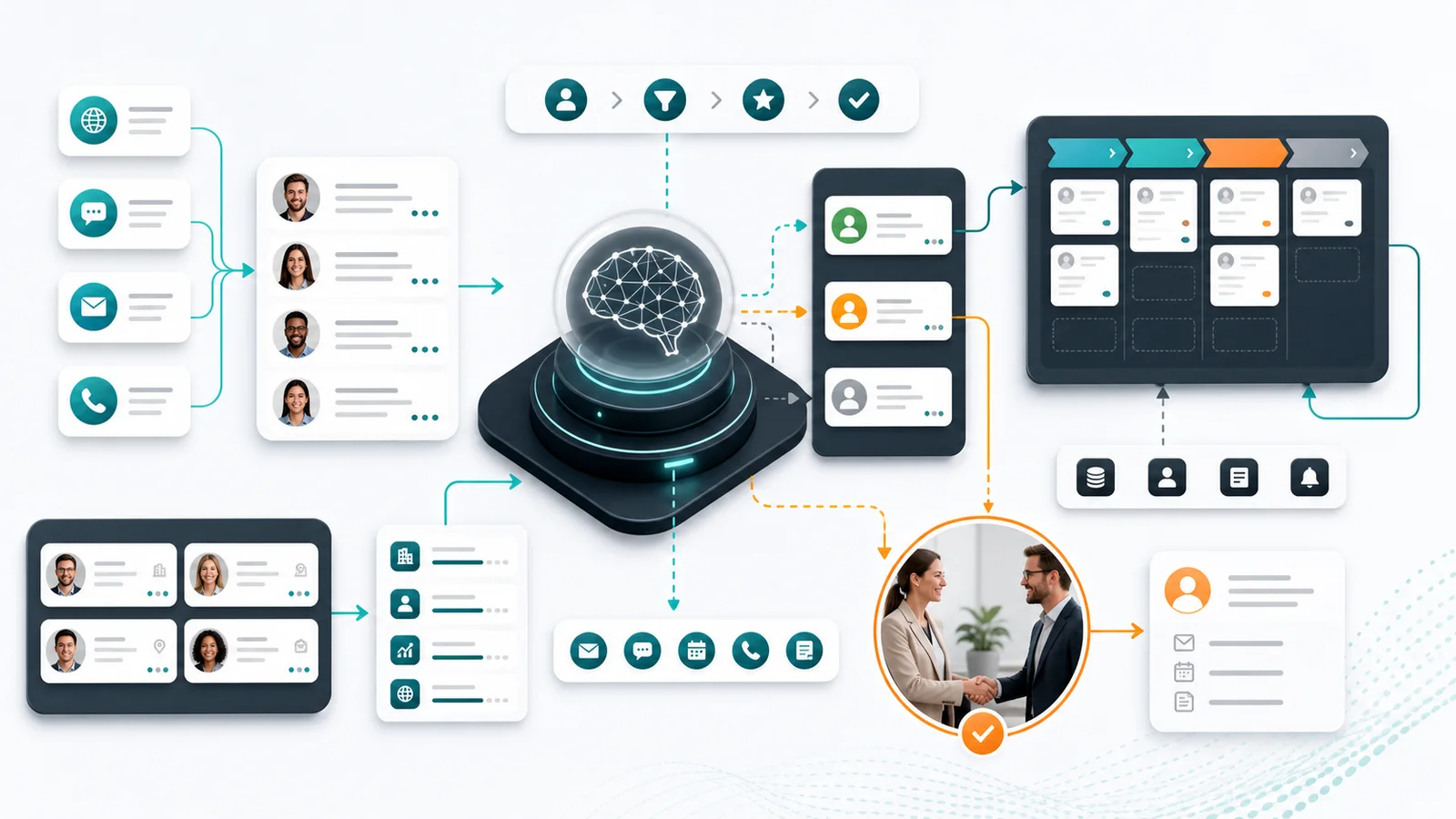
For teams asking how to design an AI workflow that enriches inbound leads and routes them into a CRM automatically, the shortest answer is: collect the lead source and message, enrich the company and contact, classify fit and intent, ask only the missing qualification questions, route the lead by score and ownership rules, then write the summary, status, next step, and handoff context back to the CRM. That exact workflow is still the highest-signal query family in GrowthEffect’s stored Search Console evidence for this page on July 9, 2026.
Key Takeaways
– AI sales automation should start with the workflow, not the tool.
– The best first use cases are inbound response, outbound prospecting, enrichment, scoring, routing, follow-up, and CRM updates.
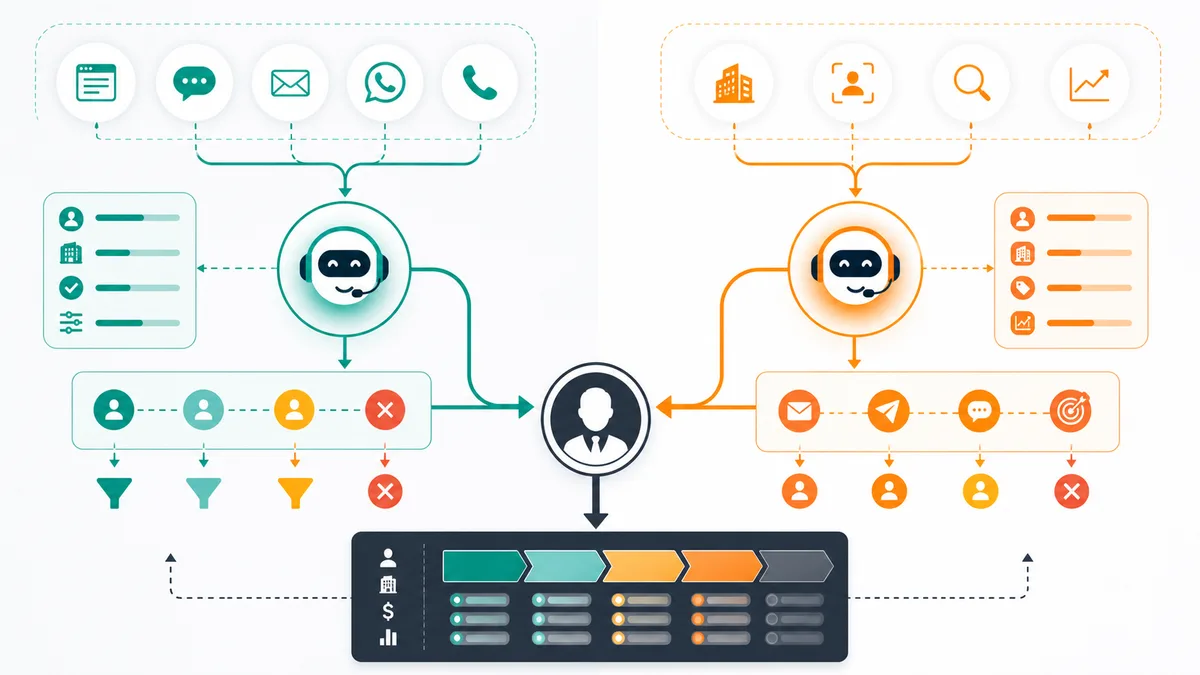
– Alim and Vera should not be mixed into one vague “AI assistant” story: Alim handles inbound, Vera handles outbound.
– Humans should stay close to discovery, negotiation, strategic accounts, custom pricing, and closing.
– A good AI sales system is measured by qualified meetings, CRM completeness, speed to lead, reply quality, and pipeline created, not message volume.
What Does It Mean to Automate Sales with AI?
Automating sales with AI means giving AI responsibility for structured first-touch sales work: lead capture, qualification, account research, lead scoring, message drafting, follow-up, routing, meeting handoff, and CRM logging.
Traditional automation follows fixed rules. If a form is submitted, assign the lead. If a deal changes stage, create a task. If a prospect does not reply, send email two.
AI adds judgment inside the workflow. It can read a lead’s message, summarize intent, classify fit, draft a relevant response, decide whether the lead needs more qualification, and suggest the next action for a human rep.
HubSpot defines sales automation as software that handles repetitive sales tasks such as lead routing, email follow-up sequences, pipeline updates, and activity logging: HubSpot sales automation guide. Salesforce frames AI-guided selling as AI that surfaces deal context, insights, and next-best actions across the sales process: Salesforce AI-guided selling.
That distinction matters. Bad automation sends more messages. Good AI sales automation makes the next step clearer, faster, and more consistent.
Step 1: Pick the Sales Motion You Want to Fix
Do not start by asking, “Which AI sales tool should we buy?”
Start with the leak.
Is your inbound response too slow? Are demo requests sitting untouched? Is outbound inconsistent? Are reps spending hours researching accounts? Is CRM data unusable? Are follow-ups happening only when someone remembers?
Map your process in plain language:
| Sales stage | What usually breaks | AI automation opportunity |
|---|---|---|
| Lead capture | Leads arrive from forms, chat, email, DMs, and lists with no single owner | Centralize new leads and detect source, channel, and intent |
| Enrichment | Reps search LinkedIn, company sites, and CRM manually | Add company, role, firmographic, and context fields |
| Qualification | Every rep qualifies differently | Ask structured questions and classify fit |
| Scoring | Priority is based on rep instinct | Score fit, role, intent, urgency, and channel signal |
| Outreach | First-touch messages are slow or generic | Draft personalized messages from real account context |
| Follow-up | Timing depends on memory | Trigger contextual follow-ups and stop on replies |
| Routing | Hot leads wait in queues | Send qualified leads to the right owner quickly |
| CRM hygiene | Notes are missing or inconsistent | Write summaries, status, next step, and owner back to CRM |
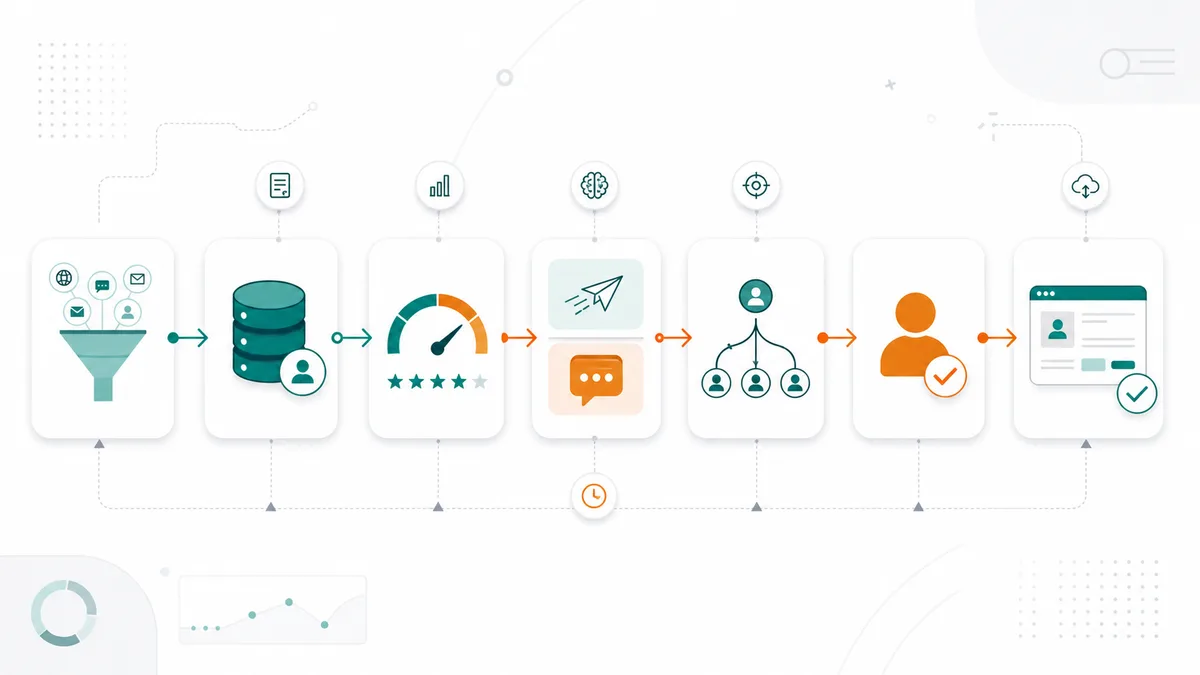
McKinsey’s B2B sales AI guidance makes the same point: start with the business problem, not the technology. It notes that in some low-tolerance workflows, simple automation with direct links to the source can be more reliable than generative AI: McKinsey on gen AI in B2B sales.
The practical rule: automate the repeatable work first. Keep humans on the work where trust, judgment, negotiation, and relationships matter.
That is also the safer GEO pattern. Google says pages can appear in AI features by following the same foundational SEO best practices used for Search overall, with no extra technical requirements beyond normal indexability and snippet eligibility. In practice, that means your workflow explanations should stay explicit, textual, and easy to quote, not hidden behind vague diagrams or product fluff.
Step 2: Automate Inbound Response with Alim
Inbound automation is usually the fastest place to prove value.
When a buyer asks for pricing, submits a demo form, starts a website chat, or sends a WhatsApp message, response speed matters. The lead is active now. If nobody answers while the buyer still cares, the pipeline leak has already started.
An AI inbound workflow should look like this:
- A lead enters from a connected inbound channel.
- AI identifies the source, person, company, message, and intent.
- AI responds quickly with a relevant first message.
- AI asks qualification questions based on your sales criteria.
- AI classifies the lead as hot, warm, cold, or not a fit.
- Hot leads are routed to the right human with context.
- Warm leads enter a nurture or follow-up path.
- Low-fit leads are exited politely or handled with a lighter workflow.
This is the role of Alim, GrowthEffect’s inbound AI sales representative. Alim is not an outbound prospecting agent. He is the inbound first-touch layer: response, qualification, routing, CRM sync, and meeting handoff.
Define these rules before you automate:
- Which inbound channels Alim can answer.
- Which questions Alim should ask.
- Which answers make a lead hot, warm, cold, or not a fit.
- Which topics require human escalation.
- Which CRM fields must be updated.
- Which routing or calendar rules apply after qualification.
If those rules are not clear, AI will improvise. That is where trust breaks.
Step 3: Automate Outbound Prospecting with Vera
Outbound AI automation should not mean blasting more cold email.
The real problem in outbound is not only writing. It is the full work chain: defining the ICP, finding the right accounts, enriching records, filtering bad leads, researching the company, choosing a relevant angle, writing the message, following up, and stopping when the prospect engages.
An AI outbound workflow should look like this:
- Define ICP criteria by company type, size, industry, geography, role, and trigger.
- Source accounts and contacts that match those criteria.
- Enrich each lead and company record.
- Score fit before any outreach happens.
- Research the account for a specific reason to reach out.
- Draft a personalized first-touch message.
- Run a controlled LinkedIn or email sequence.
- Classify replies.
- Route positive replies to a human with context.
- Suppress bad-fit, negative, or no-contact leads.
This is the role of Vera, GrowthEffect’s outbound AI sales representative. Vera is not just an email sequence tool. Her job is outbound pipeline generation across sourcing, enrichment, scoring, research, outreach, and follow-up.
Outbound guardrails matter more than volume:
- Keep ICP narrow.
- Filter aggressively before outreach.
- Require a real reason to contact the account.
- Do not let AI invent facts about the prospect.
- Pause automation when someone replies.
- Route positive replies to a human before momentum is lost.
The metric is not “messages sent.” The metric is qualified conversations created from the right accounts.
Find the Sales Automation Leak
If you are not sure whether the first automation should be inbound response, outbound prospecting, CRM handoff, or follow-up, start with the GrowthEffect revenue leak scan. It helps separate the workflow that needs an AI worker from the parts that should stay human-owned.
If the workflow question is also a hiring or software-spend question, compare the manual SDR path against a digital sales employee on the GrowthEffect pricing page. For this cluster, the recommended lead magnet is the AI SDR Readiness Checklist.
Step 4: Build a Lead Scoring Model Before You Route Anything
AI sales automation needs a priority system. Without scoring, every lead looks urgent and every prospect looks worth contacting.
Start with four scoring dimensions:
| Dimension | What it answers | Example signals |
|---|---|---|
| Fit | Is this the right type of company? | Industry, company size, market, sales motion |
| Role | Is this person relevant to the buying process? | Founder, CEO, Head of Sales, RevOps, CFO |
| Intent | Is there active buying behavior? | Demo request, pricing page, integration question |
| Urgency | Does this need action now? | “This quarter,” active evaluation, strong reply sentiment |
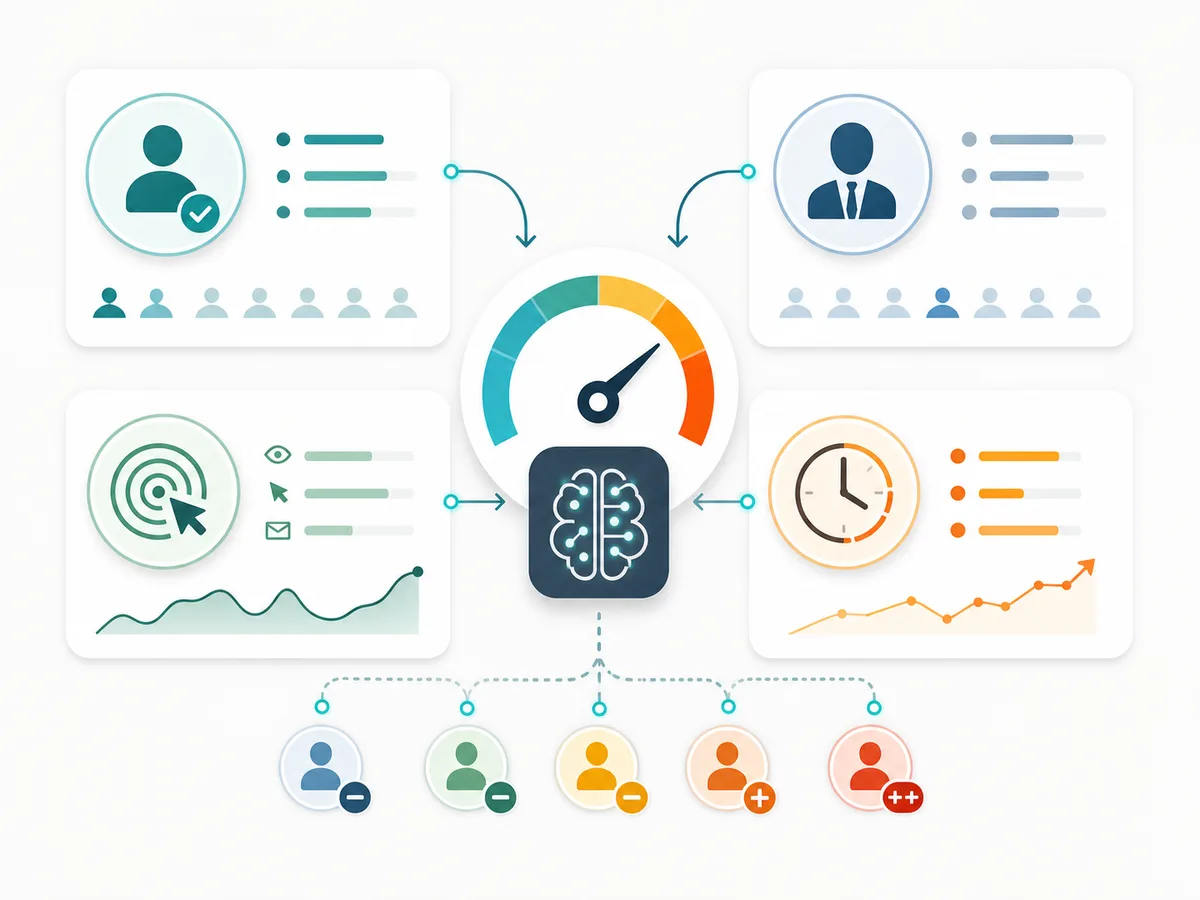
McKinsey identifies “next-best opportunity” and “next-best action” as important B2B sales AI use cases. AI can combine CRM data, engagement, intent, and external signals to help sellers prioritize opportunities and decide what should happen next: McKinsey B2B sales AI use cases.
Use simple score bands first:
| Score band | Meaning | Action |
|---|---|---|
| 80-100 | High fit and high intent | Route to sales immediately |
| 60-79 | Good fit but needs qualification | AI asks follow-up questions |
| 40-59 | Early-stage or low urgency | Add to nurture |
| 0-39 | Low priority | Do not send to sales |
| Negative | Bad fit or irrelevant | Suppress or exit |
Scoring only matters if it triggers action. A 94-point lead that sits untouched in the CRM is not an automation success.
Step 5: Automate Follow-Up Without Losing Context
Follow-up is where many sales teams lose pipeline quietly.
The first touch happens. The prospect replies “interesting.” Someone promises to circle back. Then the thread disappears under calls, demos, Slack messages, and CRM tasks.
AI can help in three ways:
- Detect that a follow-up is needed.
- Draft a follow-up based on the actual context.
- Decide whether the next step should be automated or human-owned.
Practical examples:
- A demo lead does not book a meeting: AI sends a short reminder and offers next steps.
- A prospect says “maybe later”: AI classifies the reply as warm and schedules a future follow-up.
- A lead asks about pricing: AI routes to a human and summarizes the question.
- A deal goes inactive: AI alerts the owner and drafts a re-engagement message.
- A meeting ends: AI creates a recap, next step, and CRM note.
HubSpot’s AI workflow examples cover automation across lead generation, qualification, nurturing, conversion, and post-sale engagement: HubSpot AI sales automation examples. The common pattern is not “replace the seller.” It is “keep the workflow moving when the seller would otherwise be doing repetitive coordination work.”
Every automated follow-up should be explainable:
- Why did this message send?
- What data did AI use?
- What happens if the prospect replies?
- When does a human take over?
If your team cannot answer those questions, the workflow is too opaque.
Step 6: Connect AI to the CRM as the Source of Truth
AI sales automation fails when it creates a second sales system outside the CRM.
The CRM should remain the source of truth for:
- contacts
- companies
- lead source
- qualification status
- score and priority
- owner
- last touch
- next step
- meeting status
- conversation summary
- deal stage
AI should read from the CRM and write back to it. It should not leave important context inside a chat transcript, email thread, spreadsheet, or side dashboard.
At minimum, the AI layer should update:
- lead status
- fit and intent score
- qualification summary
- objections or questions
- next recommended action
- owner assignment
- meeting booking status
- last interaction date
McKinsey’s example of automated account planning is useful here: AI-generated account plans are most valuable when they are integrated into the CRM and become a single source of truth for sellers: McKinsey on AI for B2B sales leaders.
The CRM discipline is not admin. It is what lets the human sales team trust the AI handoff.
Step 7: Add Guardrails Before You Scale
AI sales automation should be constrained before it is scaled.
You need clear rules for what AI can do, what it can recommend, and what it must escalate.
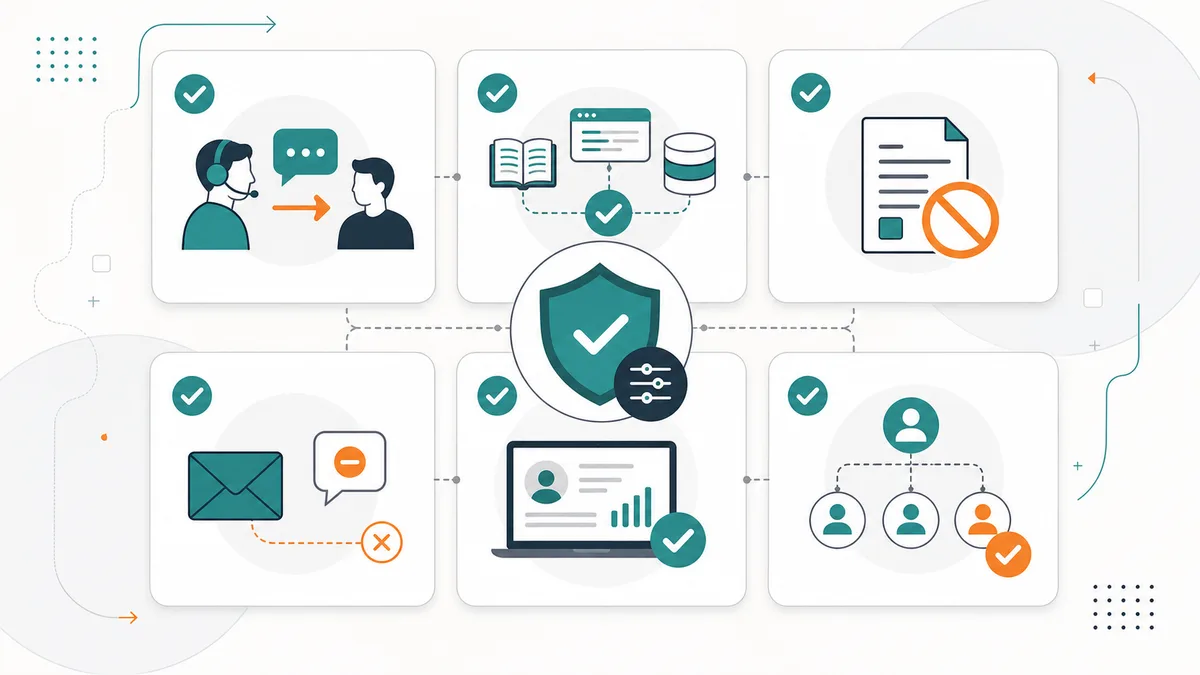
Use these guardrails:
- AI can qualify leads, but humans approve enterprise pricing or custom terms.
- AI can draft outbound messages, but strategic accounts can require human review.
- AI can answer product questions only from approved knowledge sources.
- AI can book meetings only when qualification conditions are met.
- AI must not invent discounts, legal promises, integrations, customer logos, or performance claims.
- AI must stop automation when a prospect replies negatively or requests no further contact.
- AI must log the reason behind scores, routing, and next actions.
Google’s guidance for AI features in Search is a useful parallel: there are no special shortcuts. The fundamentals still matter: helpful content, crawlable pages, internal links, high-quality media when useful, and structured data that matches visible page content: Google Search Central on AI features.
The same is true in sales operations. AI does not remove the need for quality. It increases the need for accurate data, approved source material, and visible controls.
A 30-Day AI Sales Automation Rollout
Here is a practical rollout for a B2B team that wants to automate sales with AI without turning the whole revenue engine upside down.
Days 1-7: Define the Operating Rules
- Write your ICP.
- Define hot, warm, cold, and not-fit leads.
- Choose one starting motion: inbound or outbound.
- List allowed channels.
- Define required CRM fields.
- Write escalation rules.
- Choose the main CTA and handoff point.
Days 8-14: Build the First Workflow
For inbound:
- Connect lead source.
- Create first-response logic.
- Add qualification questions.
- Add score bands.
- Route hot leads.
- Write CRM summaries.
For outbound:
- Define sourcing criteria.
- Enrich records.
- Score fit before outreach.
- Research each account.
- Draft first-touch messages.
- Route positive replies.
Days 15-21: Review Every AI Decision
- Compare AI scores against sales judgment.
- Check every routed lead.
- Review every suppressed lead.
- Inspect message quality.
- Check CRM field completion.
- Tighten prompts, rules, and escalation paths.
Days 22-30: Expand Carefully
- Add a second channel.
- Add nurture paths.
- Add reporting.
- Add meeting handoff.
- Review conversion and reply quality weekly.
- Keep humans in the loop until trust is earned.
This is how AI moves from a demo to a sales workflow.
What Not to Automate with AI
Some sales work should stay human-owned.
Do not fully automate:
- strategic account planning
- complex discovery
- legal or procurement negotiation
- custom pricing
- sensitive objections
- enterprise stakeholder mapping
- final closing
- relationship repair
AI can prepare, summarize, suggest, and execute structured first-touch work. Humans should own judgment-heavy moments.
That is the core GrowthEffect model: AI sales team for first-touch execution, human sales team for the moments where trust and judgment close the deal.
How to Measure AI Sales Automation
Do not measure AI sales automation by message volume. More activity can just mean more noise.
Measure whether the workflow creates cleaner pipeline:
| Metric | Why it matters |
|---|---|
| Speed to lead | Shows whether inbound response improved |
| Qualified meeting rate | Shows whether qualification and routing work |
| Positive reply rate | Shows outbound message quality |
| Bad-fit suppression rate | Shows whether AI protects sales time |
| CRM completion rate | Shows whether records are usable |
| Follow-up completion rate | Shows process consistency |
| Handoff acceptance | Shows whether reps trust the AI output |
| Pipeline created | Shows business impact |
Review these weekly. Look at the leads AI routed, the leads it suppressed, the messages it sent, and the handoffs your sales team accepted or rejected.
The fastest way to improve AI sales automation is to compare AI decisions against real sales outcomes.
Conclusion: Automate the First-Touch Sales System
The right way to automate sales with AI is to automate the first-touch sales system: capture, qualify, enrich, score, research, follow up, route, and update the CRM.
Start narrow. Give AI clear rules. Keep humans in the loop. Then scale once the workflow proves it can create cleaner pipeline.
If inbound response is your leak, start with Alim. If outbound creation is your leak, start with Vera. If both sides are leaking, build a full AI sales team that handles the first-touch funnel while humans focus on closing.
If the decision is partly operational and partly economic, compare the workflow against the GrowthEffect pricing page. If the leak is still unclear, use the GrowthEffect revenue leak scan before you automate more steps.
Book a GrowthEffect demo to see how Alim and Vera would handle your real pipeline, not a scripted sample.
FAQ
How do you automate sales with AI?
You automate sales with AI by mapping repeatable sales tasks, connecting lead sources and CRM data, using AI to enrich and score leads, automating first-touch response or outreach, routing qualified leads, and logging summaries and next actions back to the CRM.
What sales tasks should be automated first?
Start with inbound response, lead routing, enrichment, scoring, follow-up, CRM updates, prospect research, and meeting handoff. These tasks are repetitive, time-sensitive, and directly tied to pipeline quality.
Can AI replace sales reps?
AI should not replace the full sales role. It is strongest at first-touch work, research, scoring, follow-up, CRM updates, and next-step recommendations. Humans should still own discovery, closing, negotiation, strategic accounts, and relationship-heavy selling.
Should I start with inbound or outbound automation?
Start with the biggest leak. If buyers are already reaching out but response is slow, start with inbound automation. If pipeline creation is inconsistent, start with outbound prospecting automation.
What is the difference between Alim and Vera?
Alim handles inbound lead response, qualification, routing, CRM sync, and meeting handoff. Vera handles outbound sourcing, enrichment, scoring, research, personalized outreach, follow-up, and pipeline generation.
Leave a Reply